
FIELD NOTES / Percentages
Rounding percentages without losing the meaning
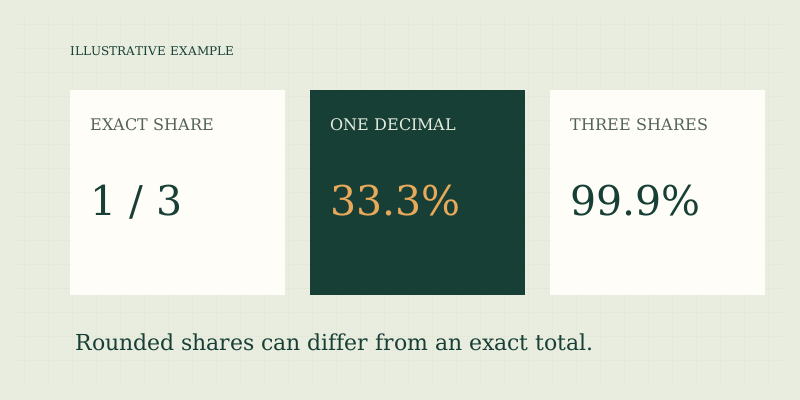
Keep unrounded values through intermediate calculations and round when presenting the final result. A percentage calculated from rounded inputs may differ from one calculated from original counts. Extra decimal places do not create extra measurement precision, and rounded percentages can total slightly above or below 100%.
Work from the most precise inputs
Suppose an illustrative group has 1 completed item out of 3. Its exact share is one third, so the percentage repeats: 33.3333…%. Displaying 33.3% is a presentation choice. If three equal groups are each displayed as 33.3%, their displayed total is 99.9%, even though the exact shares total 100%.
| Exact fraction | Displayed to one decimal | Displayed to two decimals |
|---|---|---|
| 1 ÷ 3 | 33.3% | 33.33% |
| 2 ÷ 3 | 66.7% | 66.67% |
| 1 ÷ 8 | 12.5% | 12.50% |
Do not alter a category arbitrarily to force a total of 100% unless the reporting method explicitly specifies an allocation rule. A note that totals may differ because of rounding often communicates the situation more accurately than changing one value without explanation.
Avoid rounding twice
Consider an illustrative fraction of 1 ÷ 6. Rounding the decimal ratio to 0.17 before multiplying by 100 produces 17%. Multiplying the unrounded ratio by 100 first produces 16.6666…%, which rounds to 16.7% at one decimal. The first approach discarded useful information too early. Similarly, a discount calculation with several stages should generally retain the intermediate reduced price until the final display, unless the actual transaction rounds each line separately. Mathematical precision and invoice rules are different concerns. If reconciling a bill, reproduce the bill's documented sequence and rounding policy rather than assuming a universal standard.
Distinguish decimal places from significant digits
Decimal places describe digits after the decimal point. Significant digits describe meaningful digits beginning at the first nonzero digit. The result 0.00456 has five decimal places and three significant digits. The value 123,000 may have ambiguous precision without context. A calculator's formatted number is a display, not a statement about the measurement process. This site's tools display up to ten significant digits and perform arithmetic with JavaScript numbers. That helps avoid unreadably long outputs, but binary floating-point arithmetic can leave tiny computational differences. A result very close to an expected exact decimal is not automatically evidence that the underlying formula is wrong. For contractual or regulated calculations, use the required arithmetic and rounding method.
Small percentages need the base
An illustrative change of 0.1% sounds small, but its absolute size depends on the base. Of 100, it is 0.1; of 1,000,000, it is 1,000. Conversely, a very large percentage change may arise from a tiny original quantity. Always keep the original amount in the explanation when the magnitude matters. For a displayed rate moving from 0.04% to 0.05%, rounding both to one decimal place would show 0.0% and conceal the difference. Use enough precision to communicate the actual distinction, then explain any uncertainty or limitations. Do not simply add decimal places to imprecise input data and imply that the comparison is more certain.
Report counts alongside shares
If 2 of 7 illustrative attempts succeed, the rate is about 28.6%. Writing “2 of 7, approximately 28.6%” makes the denominator and precision visible. A rate of 28.6% by itself could come from many different sample sizes. This guide does not provide statistical confidence intervals, and a precise-looking percentage does not establish statistical reliability. When percentages come from a publication, use the original data where available and follow its definitions. If only rounded values are available, label your derived result approximate. Do not back-calculate an exact headcount from a rounded percentage and present it as observed data.
A rounding checklist
- Preserve original counts or unrounded numerical inputs.
- Choose the required operation before formatting the output.
- Retain intermediate precision unless an applicable rule says otherwise.
- Select final decimal places appropriate to the question and input quality.
- State “approximately” where the displayed result is rounded.
- Explain totals affected by rounding instead of hiding the difference.
- Use an independent calculation for consequential monetary reporting.
Try percentage calculator share mode with 1 and 3 to see its display convention. Percentage basics explains decimal input, weighted percentages explains pooled counts, and discounts discusses line-item rounding in sale-price comparisons.
Keep a reproducible record
Save the original numerator and denominator alongside the formatted percentage. If a report later changes from one decimal place to two, those inputs allow the display to be regenerated without trying to recover information from a rounded value. This is also useful when reconciling totals across two reports that use different formatting conventions. Compare their underlying counts first, then their rounding rules, before concluding that the data disagree.
FAQ
Why does a table total 99.9%?
Its categories may have been rounded individually. Check whether the exact categories exhaust the same whole and whether a rounding note is present. Overlap or missing categories are other possibilities.
Should I round every monetary step to cents?
Follow the actual transaction or reporting rule. For a pure mathematical example, retaining precision until the end is useful. A real invoice may round individual lines and produce a different total.
Can more digits fix uncertain inputs?
No. More display precision cannot correct a rough measurement, a rounded source value, or a poorly defined denominator. Improve the input and definition first.
Sources
- Sources and methods — display precision and calculator limitations.
- Bureau of Labor Statistics: calculating percent changes — official worked relative-change examples and reference-basis guidance.
Put the method to work.
Open calculator ↗