
FIELD NOTES / Dates & days
Counting days between dates: start with the convention
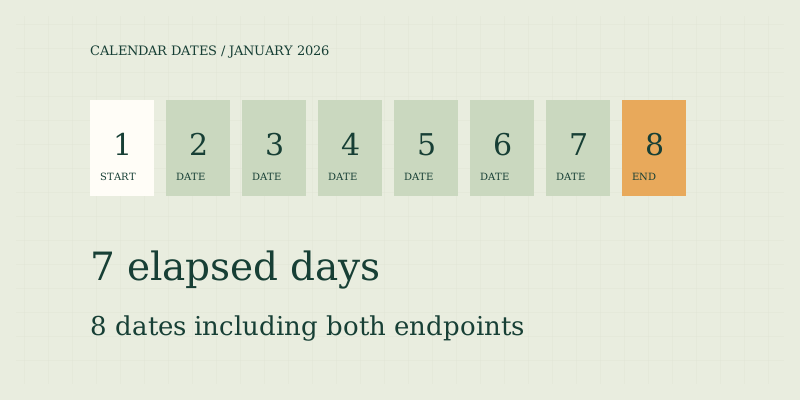
To count days between two dates, decide whether you want elapsed calendar days or the number of dates included in the interval. From January 1 to January 8 there are seven elapsed days, but eight dates if both endpoints count. The difference is a counting convention, not a contradiction.
Choose what you are counting
A date identifies a place on a calendar. An elapsed-day interval measures the number of calendar boundaries between two dates. An inclusive count measures the calendar dates touched, including both endpoints. Weekday counting removes selected days of the week, and a business calendar may remove additional dates according to an organization's rules.
| Illustrative interval: Jan 1–8, 2026 | Convention | Result |
|---|---|---|
| Elapsed calendar days | Start excluded, end included | 7 |
| Inclusive calendar dates | Both dates included | 8 |
| Monday–Friday dates | Start excluded, end included | 5 |
The weekday total is not a claim that all five days are working days for a particular organization. This site does not remove holidays. The example dates demonstrate arithmetic only and are not a deadline recommendation.
Use the start as day zero
When adding an offset, the starting date is day zero. One day after January 1 is January 2. Seven days after January 1 is January 8. If you number January 1 as day one, the seventh date is January 7. Those two descriptions differ because one asks for an offset and the other asks for a numbered sequence. Write the intended convention in words before calculating. “Seven days after” and “the seventh day including today” may refer to different dates. A school schedule, event plan, or agreement may define its own count. The calculator cannot infer those definitions from a start date alone.
Keep calendar days separate from hours
A date-only calculation does not ask when during the date an event occurs. From one calendar date to the next is one calendar-day step, even when local clocks change. Measuring elapsed hours requires start and end times, time zones, and rules for ambiguous or missing local times. Those inputs are outside this site's date tool. The implementation uses date-only Gregorian arithmetic rather than dividing local-time timestamps across daylight-saving transitions. This keeps its result aligned with the selected calendar dates. It does not mean that every local day always contains the same number of elapsed hours, nor does it determine a cutoff time for a filing or delivery.
Check leap years and month lengths
Months do not have one fixed length, and a calendar year is not always 365 days. The Gregorian rule makes years divisible by four leap years except century years not divisible by 400. Thus 2000 was a leap year and 2100 will not be. The leap-year guide explains the rule and examples. For a count crossing February, let the calendar determine the number of days rather than inserting a memorized month average. Similarly, “one month later” cannot generally be replaced with “30 days later.” If a rule uses calendar months, it needs a month-addition policy, especially for dates near month-end. This tool intentionally accepts day offsets only.
A date-counting worksheet
- Record both dates with a four-digit year.
- Spell out the month when copying from a document with an ambiguous numeric format.
- Decide whether the start counts, and whether the end counts.
- Choose all calendar dates or Monday–Friday dates.
- Check whether a separate holiday calendar is required.
- Record the chosen convention alongside the result.
- Verify any official deadline with the organization that controls it.
If an interval ends before it starts, this calculator asks you to correct the order. It does not silently swap the dates because that could hide a mistaken entry. To move backward from a date, use a negative value in add/subtract mode instead.
Explore the date field notes
Read inclusive date counting for endpoint examples, adding and subtracting days for offsets, and weekdays versus business days for holiday limitations. Use leap years for February, months versus days for variable month lengths, and date formats and time zones before copying dates across systems. The date calculator implements the stated conventions.
Check a short interval first
Before counting a long period, test the chosen settings on two neighboring dates. Elapsed mode should return one day; inclusive mode should return two dates. Then test a same-day interval. This confirms the convention independently of month lengths and makes it easier to spot an unintended checkbox setting. If the short examples match your intended meaning, use the same settings for the longer interval and retain them with your notes.
FAQ
Does the same date count as zero or one?
It is zero elapsed days. It is one inclusive calendar date. In inclusive weekday mode it counts as one only if it falls Monday through Friday; a Saturday or Sunday contributes zero.
Does this tool calculate legal deadlines?
No. It does not interpret rules about notice, holidays, service methods, cutoff times, or extensions. Confirm consequential dates with the responsible authority or a qualified professional.
Can I use historical dates?
The supported range is years 0001–9999 using a projected Gregorian calendar throughout. That does not reproduce every region's historical calendar or adoption date. Use a specialized historical reference when that distinction matters.
Sources
- US Naval Observatory: Leap Years — Gregorian leap-year convention.
- Sources and methods — date-only arithmetic and endpoint assumptions.
Put the method to work.
Open calculator ↗